
Madison, NJ Call: (732) 434-1033
👉 Capacity Fill Rate (CFR) and Overall Provider Utilization Rate (OPUR) are the only reliable way to unlock your monthly new intake requirement.
Live Capacity Fill Rate vs. Overall Utilization
Target Goal: 35.0%
15.0%
⚠️ Below Target (-20.0%)
Target Goal: 85.0%
87.0%
✅ On Target (+2.0%)
Most mental health practice owners spend hours wading through EHR portals and spreadsheet clutter, yet still miss the two numbers that actually control financial health:
Capacity Fill Rate (CFR): Are open appointment slots actually getting booked and attended?
Overall Provider Utilization Rate (OPUR): Are your clinical hours spent generating revenue without driving clinicians to burnout?
CapacityIQ® eliminates the guesswork. Track your CFR and OPUR instantly, optimize capacity, and build a profitable, sustainable practice without administrative overhead.
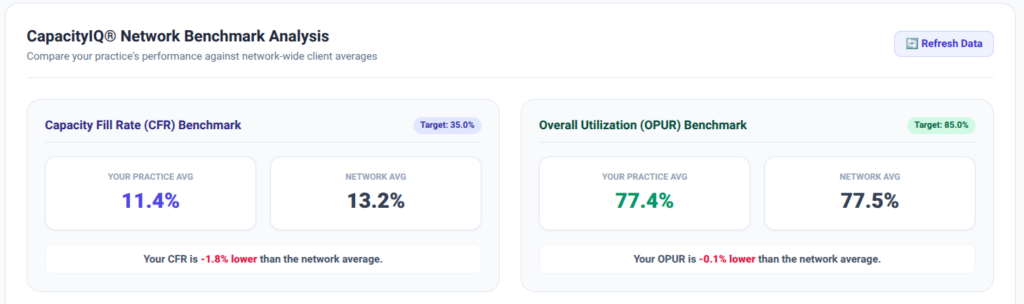
Compare practice performance side-by-side against network averages
Enterprise Security: Complete data isolation per practice with secure Email + 4-Digit PIN authentication. Your practice data remains protected and confidential.
Instant Frictionless Public Demo: Experience the platform instantly with a single PIN. No sales calls, no onboarding friction.
Live KPI Trackers & Color-Coded Gauges: Visual performance tracking powered by dynamic gauges. Instant clarity with health thresholds: Green (target met), Amber (approaching), and Red (action required).
Actionable Growth Suggestions: Receive performance-tier recommendations based on your real-time numbers so you know exactly how to optimize your schedule.
Network Benchmarking & Historical Analytics: Compare practice performance side-by-side against network averages and analyze historical multi-week line charts to spot trends before they impact cash flow.
Integrated In-App Support: Report issues, request features, or access support instantly inside the application without interrupting your workflow.